
CamScanner Addresses Users' Increasing Demands by Continuous Feature Innovation
CamScanner is one of the most popular and successful scanner apps in the market. How does it make such an achievement? Industry insiders believe CamScanner's dedication to introducing innovative, ground-breaking, and superior features is one of the primary reasons for the company's meteoric rise to the top of the fierce industrial competition.
It's possible that you're already aware that you can scan, edit, and share documents on any of your devices or on any of your social media platforms using this app. However, CamScanner offers more than what you have known. It addresses users’ increasing diversified demands by continuous feature innovation. Here we share several features that you may be unfamiliar with. By learning these interesting features, you can definitely improve your work efficiency and productivity.
Portrait Enhancement
"Portrait Enhancement" is a newly released feature. CamScanner enables users to utilize a variety of editing tools, including colorization and enhancement options to bring their old blurry pictures back to life.
Users can access this new feature after installing or upgrading the scanner app by first clicking the camera icon and then scrolling to the "Portrait Enhancement" page. They can upload or take a photo, confirm the cropping range, and then click to start the restoration process. When CamScanner has finished mending, it will display a preview where users can use the slider to compare the newly edited photo to the old one. They can save the colorized and repaired photo if they are pleased with the results.
Remove the Shade from Your Scanned Document
It's common to see shades after scanning a document with a phone app or a scanner. This is due to poor lighting conditions or, in the case of printers, old hardware. Fortunately, thanks to CamScanner's "no shade filter," you no longer have to deal with this annoyance. This magical tool can render your scanned document without any shades or unwanted lighting effects. This takes only a few seconds because you only need to press the image and select "No Shadow" from the bottom menu.
Scan Multiple Pages at Once
In reality, there are always situations in which you need to scan and edit files with numerous pages at once. With CamScanner, rather than scanning a single page at a time, you can scan an unlimited number of files simultaneously, after which you can edit and upload all of the scanned documents together. You are free to retake any of these pictures and continue on with your work even if you accidentally took a poor quality photo of one of the files. There is no need to begin again.
Share Documents Across Platforms
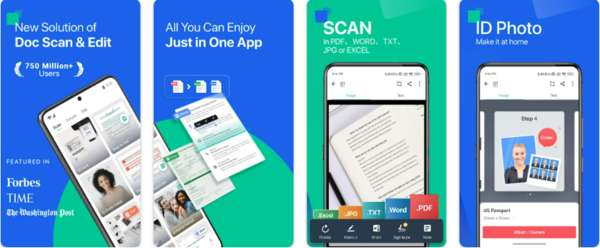
Are you looking for a more efficient method to continually edit and share files on both your phone and your computer? Another innovative feature of CamScanner is its capacity to let users open and/or edit files that have been saved on their phones directly on their computers. This cross-sharing platform is perfect for working from the location in which you are happiest and most productive. To accomplish this, you simply need to follow these steps:
First, locate the button labeled "Share" in the upper right corner of the screen.
Second: Select "Send to your computer" from the drop-down menu.
Third: Launch CamScanner in your web browser and follow the on-screen instructions to scan the QR code with your mobile device. This will allow you to either download the file or edit it using the web-based version.
Free PDF Converter
CamScanner's official website features a wide range of tools that assist users in converting a variety of file types to PDF, including DOC, PPT, JPG, and many more. These tools also assist users in converting other file types to PDF.
Anyone who is interested can access a wide variety of PDF-related tools, such as converters and editors, at no cost to themselves. These tools are readily available and easy to use.
Intelligent Search
For office workers, you may have to deal with a lot of scanned documents. CamScanner enables you to locate your desired document quickly by simply entering keywords, and these keywords will be highlighted.
CamScanner's highly effective keyword search system is able to search not only the text but also the document's title, label, and remarks. Users can easily locate the search object, even if it is an image.
After reviewing the innovative features CamScanner has provided, it's not easy to understand why it can survive and rank at the top in the document editing industry. In a nutshell, CamScanner is a powerful document helper that supports you in managing all your paper and electronic documents across platforms with strong text recognition, multi-format conversion and other fantastic features. You will find it useful once you have tried it!
【免责声明:商业资讯本栏目发布信息,目的在于传播更多信息,丰富网络文化,稿件仅代表作者个人观点,与商业资讯无关。其原创性以及中文陈述文字和文字内容未经本网证实,对本文以及其中全部或者部分内容、文字的真实性、完整性、及时性本网不做任何保证或者承诺,请读者仅作参考,并请自行核实相关内容。凡注明为其他媒体来源的信息,均为转载自其他媒体,转载并不代表本网赞同其观点,也不代表本网对其真实性负责。您若对该稿件由任何怀疑或质疑,请即与商业资讯联系,我们将迅速给您回应并做处理】